Eddie A. asked 7 years ago
I am currently connected to the extender. However, I cannot access the extender’s admin page. I have tried entering 192.168.0.1, 192.168.1.1, 192.168.0.254 and http://re.rockspace.local and none of them are showing me the extender’s admin page. I want to verify if the extender’s has a firmware update.
Even though the extender has the blue LED light on, once in a while the connection gets lost and I wonder if it’s due to the firmware
1 Answers
 Austin Parker Staff answered 7 years ago
Dear Eddie A.,
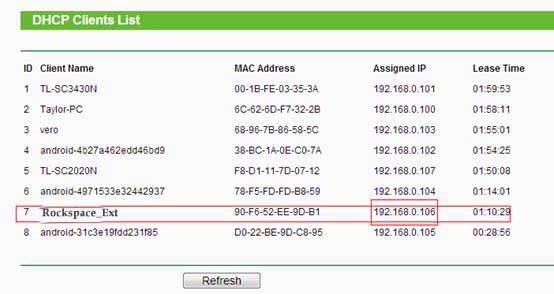
Login to your router and look for the DHCP clients..
Look fort the Rockspace extender and find the IP ADDRESSE assign by router and using that IP address login to the browser. You’ll able to access the Rockspace Extender setup page.
Here is an example of Router DHCP Client List.